
I recently did a brush up course on Networking/Protocols 101’s. Making my notes public.
Networking Basics / Protocols:
There are 7 layers of communications as defined in OSI (Open systems Interconnection) model
| Layer | Name | Core Function | Significance | Example Protocols | Mental Hook |
|---|---|---|---|---|---|
| 7 | Application | Interface for user/application | Enables end-user apps to use network (browsers, email clients). Application specific formats and logic | HTTP, FTP, SMTP, SSH, DNS, XMPP | “You (user) start here” |
| 6 | Presentation | Data translation, encryption, compression | Ensures data format is understood across systems | SSL/TLS, JPEG, MPEG, ASCII | “Translator and decorator” |
| 5 | Session | Starts, maintains, and ends communication sessions | Keeps track of sessions (chat, video, etc.) | NetBIOS, RPC | “Conversation manager” |
| 4 | Transport | Reliable delivery, error handling | Segments data, reorders, retransmits if needed | TCP (reliable), UDP (faster) | “FedEx: delivery guarantee or not” |
| 3 | Network | Logical addressing and routing | Moves packets across networks using IPs | IP, ICMP, IPSec, OSPF | “GPS: how to get there” |
| 2 | Data Link | Node-to-node delivery, MAC addressing | Ensures data is delivered over a single hop/link | Ethernet, ARP, PPP, VLAN | “Street address & postman” |
| 1 | Physical | Bit transmission over physical medium | Sends 0s and 1s via electrical/optical/mechanical means | Cables, NICs, Hubs, Modems | “Wires, Wi-Fi, fiber — raw transport” |
Mental model to think about all protocols:
- Protocols are more like rules/languages two systems agree to communicate in.
- So there are different protocols like – HTTP / SMTP / UDP / XMPP etc. When we think and relate to OSI model (7 layers), the general question is:
“At what abstraction level does this protocol operate? And does it interact with other layers?”
Each layer in the OSI model has its own type of protocol, and protocols are layered over each other, not isolated. Lower layers support upper layers.
Higher level protocols, sometimes, have hard dependency on lower layer protocols.
For example: XMPP protocol (used in instant messaging) – is a layer 7 protocol and works at Application layer.
But depends on TCP (layer 4) to operate.
It also often uses TLS (layer 6) for encryption.
TCP itself uses IP (layer 3) for routing across network
So XMPP OSI stack is as below:
XMPP (L7)
⬇
TLS (L6) – optional
⬇
TCP (L4) ← hard dependency
⬇
IP (L3)
⬇
Ethernet/Wi-Fi (L2)
⬇
Copper/Fiber (L1)
If TCP blocked, XMPP wouldn’t work.
So yes, a high-level protocol does span multiple layers indirectly but it is classified by its highest-level function.
- Think of the OSI model as a 7-story building.
- XMPP/SMTP live on the top floor (L7).
- They send messages down through elevators (TCP/UDP).
- Those messages ride the subway (IP) and hop onto the road (Ethernet) to get to the destination.
A few notes about different Protocols:
Network layer protocol:
- This is at network layer – L3
- this layer is responsible to delivery the packets from source to destination via IP addresses and routing from source -> destination.
Transport layer protocol:
This is layer4: Breaks the data into segments, adds ports, retransmits if needed. Include TCP / UDP like below:
TCP:
- retransmit data if failed
- prefers reliability of communication over the speed/throutput
- uses three-way handshake process is an agreement between the two parties to send and accept the data
- Ports:
- A connection has both a source and a destination port for communication.
- A port is a virtual point managed by an OS that defines an entry to or exit from a software application (numbered from 0 to 65535).
- You can compare them to your personal computer ports, such as USB ports.
- The following are the three divisions of range from 0 to 65535:
- (1) Well-known ports
- Range from 0 – 1023 Link
- example: 22- ssh, 80 – http
- (2) Registered ports
- Range from 1024 to 49151 Link
- Used mainly by user processes. Like openvpn – 1194
- (3) Ephemeral ports
- Range from 49152 to 65535
- can be used for private and temporary purpsouses
- If two communcation are configured to use the same port, there will be a port conflict and second process will not come up.
UDP:
less reliable, but faster
- used in low latency cases like video call, gaming, telemetry collection like in datadog
- It is faster because it doesn’t involve a three-way handshake process for establishing a connection, and it provides no guarantee of data delivery, so there is no overhead of retries.
Other Protocols:
HTTP:
- The world heavily depends on the internet for day-to-day work, and most of this work happens in web browsers and software applications running on mobile devices.
- Status codes are how you know what happened to a request sent
- HTTP has evolved, and the version represents which particular specification the application is using. — http1/http2/http3
SMTP:
- Back in the day:
- you had own a PC and run a email client on your laptop to send/receive an email
- This changed with Hotmail in 1996. – with laucnh of free web based email client
- SMTP protocol is used for email communication between two / more parties
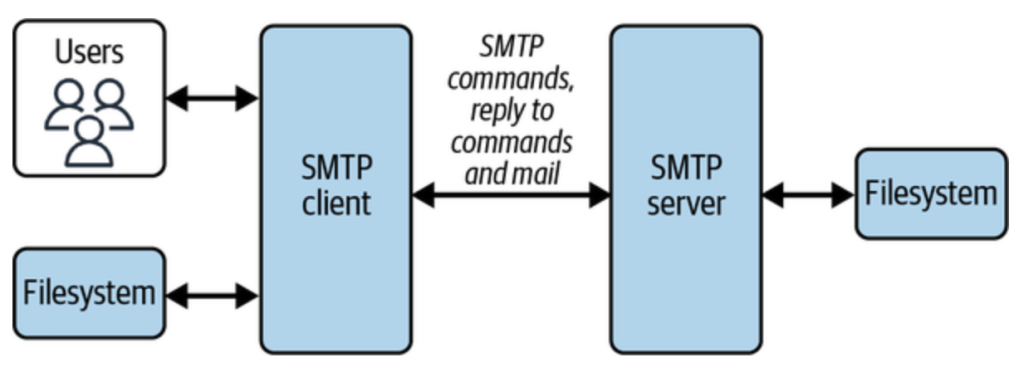
- The SMTP client identifies the mail domain (such as gmail.com, hotmail.com, etc.) and then establishes a two-way stateful channel to corresponding SMTP server(s).
- if it is gmail to gmail – then it is same smtp server
- else it is two different
- SMTP server can also act as gateway, meaning that further transport of mail is carried out with the help of other protocols, not via SMTP
- There are two other protocols, that work on pull based mechanism (like your phone pulling messages from SMTP server):
- Post Office Protocol (POP)
- POP connects with the email servers, downloads the content to the local machine, and deletes the emails from the server.
- this makes mails available for offline. and is fast as messages are already local
- Internet Message Access Protocol (IMAP)
- IMAP directly reads from servers without downloading content to the local machine or deleting the emails after reading
- this helps with syncing mails across devices as source isn’t deleted
- Post Office Protocol (POP)
XMPP:
- Extensible Messaging and Presence Protocol
- used mainly in instant messaging services
- has details of Websocket way of communication.
MQTT:
- Message Queuing Telemetry Transport
- MQTT was originally designed for applications to send telemetry data to and from space probes using minimum resources
- mainly used in IoT devices
- This is based on pub/sub model – more like kafka

- Has Different Delivery Semantics: Atmost once, Atleast once, Exactly once.
AWS Networking:
Levels involved in AWS global infra : Region –> Availability zone –> Edge locations –> Local zones –> Wavelength zones
Local Zone:
Characteristics of local zone
| Feature | Description |
|---|---|
| Ownership | Fully provisioned and managed by AWS. |
| Latency | Provide single-digit millisecond latency to users in specific locations. |
| Available Services | Core services like EC2, EBS, ECS, EKS, ALB/NLB, and Direct Connect. |
| Parent Region | Tightly integrated with a parent AWS Region (e.g., us-west-2 for Los Angeles). |
| Use Cases | Media & entertainment, gaming, real-time analytics, hybrid cloud, healthcare, etc. |
Comparison of local zone with a full AWS region:
| Factor | Managed Region (like Mumbai) | Delhi Local Zone |
|---|---|---|
| Latency to Delhi Users | ~40–60ms | ~5–10ms |
| Service Breadth | Full | Limited (mostly EC2/EBS/NLB) |
| Availability Zones | Multi-AZ | Single AZ |
| Cost | No inter-AZ data transfer | Higher due to parent↔local traffic |
| Ideal For | Scalable, full-service apps | Low-latency edge workloads |
Edge location:
- These are mainly AWS content delivery network (CDN) and Edge computing locations.
- They are fully managed services by AWS and serve as Point of Presence (PoP) for caching, routing and edge computing.
| Use Case | Description |
|---|---|
| CDN | Used by Amazon CloudFront to cache content close to users, reducing latency. |
| DNS Routing | Route 53 uses edge locations to serve low-latency DNS responses. |
| DDoS Protection | AWS Shield & WAF operate at the edge to mitigate attacks before traffic hits your backend. |
| Edge Computing | Run Lambda@Edge functions to execute custom logic close to users (e.g., URL rewrites, auth headers). |
| Global Load Balancing | AWS Global Accelerator leverages edge locations to route user traffic optimally. |
Understanding IPv4, IPv6
IPv4
- supports 32bit number IP address. Represented as dot decimal notation in 4 blocks.
- 2^32 = 4.2 billion total unique address

- Note that an IPv4 address has 4 blocks as seen above. Each block gets 8bits – 2^8. So that is
0-255range. (octate) - each ipv4 address can range from 0.0.0.0 to 255.255.255.255
- but not all ip addresses are available to use.
- 127.0.0.0/8 – loopback (e.g., 127.0.0.1)
- 192.168.0.0/16, 10.0.0.0/8, 172.16.0.0/12 – private IPs
- 0.0.0.0, 255.255.255.255 – special purpose
IPv6
- 128 bit number represented in 8blocks separated by colon
: - Total addresses 2^128
fe80:8fe0:7113:0000:8990:0000:99bf:3264is an IPv6 address.- each block above gets 16 bits, 2^16 — 0-9,a-f

Classes IPv4
- An IP address is nothing but an address for a machine to which we could deliver packets.
- It has two parts to it –
network partandhost part

- there are classes in ipv4 as A, B, C, D and E
- this is mainly based on how many bits are reserved for host and how many reserved for hosts.
| Class | Starting Bit(s) | Address Range | Default Subnet Mask | Hosts per Network | Use Case |
|---|---|---|---|---|---|
| A | 0 | 1.0.0.0 – 126.255.255.255 | 255.0.0.0 | 16 million | Very large networks |
| B | 10 | 128.0.0.0 – 191.255.255.255 | 255.255.0.0 | 65,000 | Medium-sized networks |
| C | 110 | 192.0.0.0 – 223.255.255.255 | 255.255.255.0 | 254 | Small networks |
| D | 1110 | 224.0.0.0 – 239.255.255.255 | — | — | Multicast |
| E | 1111 | 240.0.0.0 – 255.255.255.255 | — | — | Experimental |
- This leads to a lot of waste full IPs, if lets say I want only 2 million hosts – there is nothing between A and B classs.
- So CIDR was introduced and which is widely used today.
How to read CIDR noation:
- CIDR reading is mainly to know “How many bits are used for the network part and how many bits are used for the host part”.
- For ipv4, there are total of 32 bits. The /notation indicates how many bits are used for the network part.
192.168.1.0/24— means 24 bits are for network. (32-24)=8 bits are for Hosts, which is 2^8 = 256 (254, always subtract 2, networkId & broadcastAddress)
| CIDR | Net Bits | Host Bits | IPs Total | Usable Hosts | Subnet Mask |
|---|---|---|---|---|---|
| /8 | 8 | 24 | 16,777,216 | 16,777,214 | 255.0.0.0 |
| /16 | 16 | 16 | 65,536 | 65,534 | 255.255.0.0 |
| /24 | 24 | 8 | 256 | 254 | 255.255.255.0 |
| /28 | 28 | 4 | 16 | 14 | 255.255.255.240 |
| /30 | 30 | 2 | 4 | 2 | 255.255.255.252 |
| /32 | 32 | 0 | 1 | 0 | 255.255.255.255 |
- Subnet Mask above is a way of showing which part of an IP address is the network and which part is the host.
- CIDR and Subnet Mask complement each other. See how as the CIDR range increases, the IP range in Subnet Mask makes more room for HostIPs.
- Subnet being
255in a way represents that those slots are taken up byNetworkrepresentation of IP and0orless than 255representsHostrepresentation available.
AWS VPC:
- it is a aws managed service that provides a “software-define” private network. All aws accounts come with a default vpc.
- all the aws resources are hosted inside the vpc (ec2, rds etc)
- The default vpc subnets are public
| Fact Description | Value |
|---|---|
| Default VPCs per region per account | 5 |
| Default subnets per VPC per account | 200 |
| VPC is scoped to | AWS Region |
| Required to create VPC | CIDR block |
| Can VPC be divided into subnets? | Yes |
| Types of VPCs | Default, Nondefault |
| Default CIDR block for default VPC | 172.31.0.0/16 |
| Max CIDR block size for VPC | /16 |
| Min CIDR block size for VPC | /28 |
| Max number of CIDR blocks per VPC | 5 (can be increased via limit request) |
| Max number of IPv6 CIDR blocks per VPC | 1 (associated from AWS pool or BYOIPv6) |
| Default route table creation with VPC | Yes |
| Default security group creation with VPC | Yes |
| Default network ACL creation with VPC | Yes |
| Can you associate multiple subnets to a VPC? | Yes (subnets must be in same region) |

Interacting with VPC:
aws ec2 describe-vpcs --region us-west-2— will show all the vpcs and their configs in that regionaws ec2 describe-vpcs --region us-west-2 | jq '.Vpcs[].CidrBlockAssociationSet[].CidrBlock— will print the cidr block with each vpc. Play around with jq to get what you want.- While above commands will do the grepping after get all the data from the aws, below aws –filters will get only the required data
- How to get the list of available IPs count per subnet for a vpc
- change the vpc id in the below command to the one you are interested in
- the command here is
aws ec2 describe-subnets— it is just getting required fields after that
- How to get the list of available IPs count per subnet for a vpc
Internet Gateway (IGW)
- IGW is a vpc component which enables internet communication between instances in a vpc and the internet.
- Internet gateway is a horizontally scalable, redundant and highly available VPC component.
- All the subnets (AZ components), if they have to talk to internet, they will have to talk via the same internet gateway, which is setup for the vpc.
- IGW –> set as target in route table
- Route table –> attached to a subnet
- The fact that if a subnet can see an internet gateway or not, depends on the route table that is configured for that subnet.
- You have VPC: 10.0.0.0/16
- Subnets:
- subnet-a (AZ: us-east-1a): 10.0.1.0/24
- subnet-b (AZ: us-east-1b): 10.0.2.0/24
- You attach one Internet Gateway to the VPC.
- You update the route table for subnet-a to include below. But subnet-b doesn’t have any route to igw.
- So only subnet-a can talk to internet gateway setup on the vpc

- Internet Gateway has two primary responsibilities
- (1) It provides a target in route table for internet routable traffic
- A subnet does not allow outbound traffic by default. Your VPC uses route tables to determine where to route traffic.
- To allow your VPC to route internet traffic, you create an outbound route in your route table with an internet gateway as a target, or destination.
- more in the Route Table section below
- (2) It protects ip addresses on network by performing Network Address Translation
- Resources on your network that connect to the internet should use two kinds of IP addresses:
- Private IP: Use private IPs for communication within your private network. These addresses are not reachable over the internet.
- Public IP: Use public IP addresses for communication between resources in your VPC and the internet. A public IP address is reachable over the internet.
- You can either configure your VPC to automatically assign public IPv4 addresses to your instances, or you can assign Elastic IP addresses(more on elastic ips – here) to your instances. Your instance is only aware of the private (internal) IP address space defined within the VPC and subnet.
- The internet gateway logically provides the one-to-one NAT on behalf of your instance, so that when traffic leaves your VPC subnet and goes to the internet, the reply address field is set to the public IPv4 address or Elastic IP address of your instance, and not its private IP address. Conversely, traffic that’s destined for the public IPv4 address or Elastic IP address of your instance has its destination address translated into the instance’s private IPv4 address before the traffic is delivered to the VPC.
- (1) It provides a target in route table for internet routable traffic
Docs – https://docs.aws.amazon.com/vpc/latest/userguide/VPC_Internet_Gateway.html
Subnet:
- A subnet is a small subset of your Ip addresses from a vpc. You can launch any AWS resource inside a subnet.
- It is a way of splitting larger network into many small subnetworks. This mainly done using CIDR.
- Example: if we have a network with 256 host ips which we want to split into subnets of 64 ips each, this is how you will do it
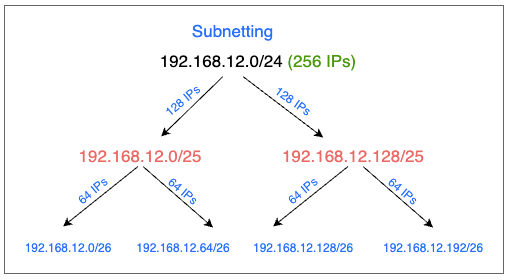
| CIDR Block | Total IPs | IP Range |
|---|---|---|
| 192.168.12.0/24 | 256 | 192.168.12.0 – 192.168.12.255 |
| ├─ 192.168.12.0/25 | 128 | 192.168.12.0 – 192.168.12.127 |
| │ ├─ 192.168.12.0/26 | 64 | 192.168.12.0 – 192.168.12.63 |
| │ └─ 192.168.12.64/26 | 64 | 192.168.12.64 – 192.168.12.127 |
| └─ 192.168.12.128/25 | 128 | 192.168.12.128 – 192.168.12.255 |
| ├─ 192.168.12.128/26 | 64 | 192.168.12.128 – 192.168.12.191 |
| └─ 192.168.12.192/26 | 64 | 192.168.12.192 – 192.168.12.255 |
- Mental model to find the ip range for a cidr givens
- subtract the /notation from 32 — that is your host ips total available
- start with given ip starting point and add those many above (total value – 1)
- Subnets can be either public or private. A public subnet if the resource in it has to connect to the internet, else it will be a private subnet.
There are other things covered like:
- Types of subnets – public / private
- Connection to internet for private subnet via NAT gateway
Route table

- Route table is a set of rules (routes) that are used to determine network traffic from a subnet.
- When a vpc is created, a main route table is also created(shown in first image). This will initially just have one single local route. This will enable traffic across resources within the vpc.
- You cannot modify local route in the route table.
- Each subnet must be associated with a route table. If not explicitly associated, the subnet will implicitly associate with main route table.
- A subnet can be associated with only one route table at a time, but a same route table can be associated with many subnets.
- subnet : route table :: one to one
- route table : subnet :: one to many
- In above image(Route Tables), you see that:
- public subnet is linked to a route table which has a route for IGW (internet gateway), so that resources in the public subnet can talk to internet
- private subnet has a route table which doesn’t have a route to IGW. So no resource in it can talk to internet directly.
NACL:
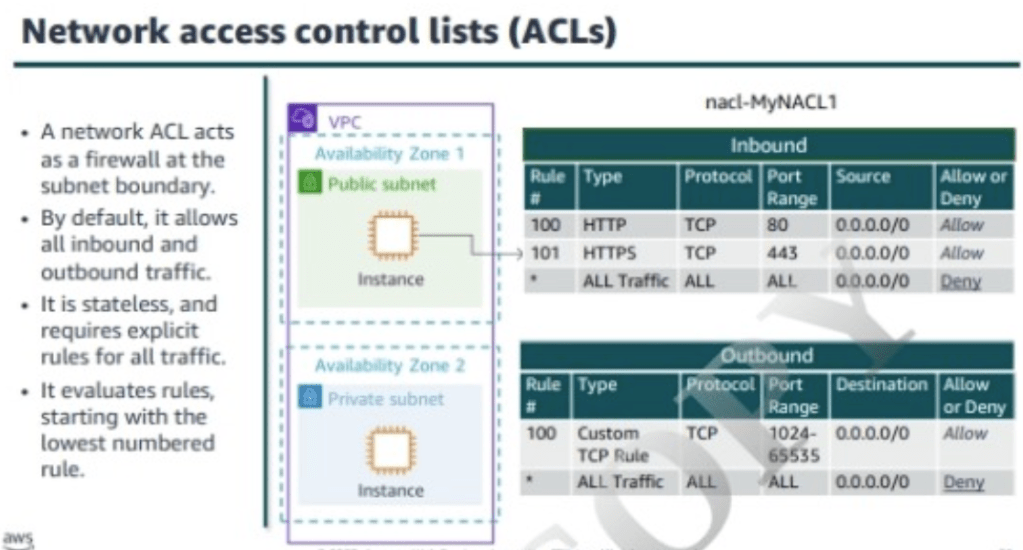
- NACL is an optional layer of security for vpc that acts as firewall for controlling traffic in and out of one or more subnets.
- vpc comes with a default NACL, which will allow all inbound and outbound IPv4 traffic.
- on creating and assigning a custom nacl, it by default denies all the inbound and outbound traffic.
- Nacl are stateless, which means there need to be explicit inbound and outbound rules set to allow or deny traffic.
This is just a dump of all notes for self reference later.
 Engineering Blog