Message delivery in Distributed Systems

In distributed systems, the principle of message passing between nodes is a core concept. But this leads to an inevitable question: How can we ensure that a message was successfully delivered to its destination?
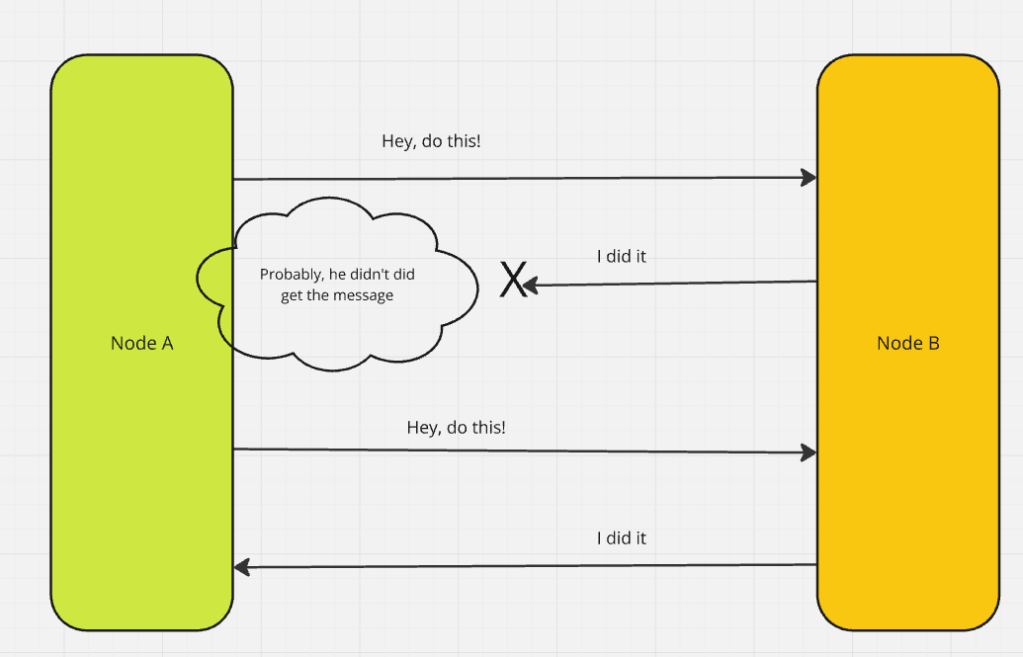
To address this, there are three types of delivery semantics commonly employed:

At Most Once

At Least Once

Exactly Once

Each of these offers different guarantees and trade-offs when it comes to message delivery. Let’s break down each one:

1. At Most Once

This semantic guarantees that a message will be delivered at most once, without retries in case of failure. The risk? Potential data loss. If the message fails to reach its destination, it’s not retried.

2. At Least Once

Here, the message is guaranteed to be delivered at least once. However, retries are possible in case of failure, which can lead to duplicate messages. The system must be designed to handle such duplicates.

3. Exactly Once

This ideal semantic ensures that the message is delivered exactly once. No duplicates, no data loss. While it’s the most reliable, it’s also the most complex to implement, as the system must track and manage message states carefully.


Achieving the Desired Delivery Semantics

To ensure these semantics are adhered to, we rely on specific approaches. Let’s examine two of the most important ones:

Idempotent Operations Approach

Idempotency ensures that even if a message is delivered multiple times, the result remains unchanged. A simple example is adding a value to a set. Regardless of how many times the message is received, the set will contain the same value.

This approach works well as long as no other operations interfere with the data. If, for example, a value can be removed from the set, idempotency may fail when a retry re-adds the value, altering the result.

Idempotency runs more close to the philosophy of stateless. Each message is treated independently without caring if it is different or same. If the signature of the message is the same, it will generate the same output.

Deduplication Approach

When idempotency isn’t an option, deduplication can help. By assigning a unique identifier to each message, the receiver can track and ignore duplicates. If a message is retried, it will carry the same ID, and the receiver can check whether it has already been processed.

Deduplication generally requires aggressive state tracking, checking on the requestId(from db or cache) before processing every item. The focus at implementation is that, the duplicate messages don’t reach the processing state at all.

However, there are several challenges to consider:

• How and where to store message IDs (often in a database)

• How long to store the IDs to account for retries

• Handling crashes: What happens if the receiver loses track of message IDs during a failure?

My Preference: Idempotent Systems

In my experience, idempotent systems are simpler and less complex than deduplication-based approaches. Idempotency avoids the need to track messages and is easier to scale, making it the preferred choice for most systems, unless the application logic specifically demands something more complex.

Exactly Once Semantics: Delivery vs. Processing

When we talk about “exactly once” semantics, we need to distinguish between delivery and processing:

Delivery: Ensuring that the message arrives at the destination node at the hardware level.

Processing: Ensuring the message is processed exactly once at the software level, without reprocessing due to retries.

Understanding this distinction is essential when designing systems, as different types of nodes—compute vs. storage—may require different approaches to achieve “exactly once” semantics.

Delivery Semantics by Node Type

The role of the node often determines which semantics to prioritize:

Compute Nodes: For these nodes, processing semantics are crucial. We want to ensure that the message is processed only once, even if it arrives multiple times.

Storage Nodes: For storage systems, delivery semantics are more important. It’s critical that the message is stored once and only once, especially when dealing with large amounts of data.


In distributed system design, the delivery semantics of a message are critical. Deciding between “at most once,” “at least once,” or “exactly once” delivery semantics depends on your application’s needs. Idempotent operations and deduplication offer solutions to the challenges of message retries, each with its own trade-offs.

Ultimately, simplicity should be prioritized where possible. Idempotent systems are generally the easiest to manage and scale, while more complex systems can leverage deduplication or exactly once semantics when necessary.


Personal “FinOps” with Ledger cli

This post is a geek-out journey this festive season on finding the right tool for my personal finance management.


Where it all started:

Recently, I spoke at the Smarsh Tech Summit on “Cost as an Architectural Pillar,” where I emphasized the importance of considering cost as a first-class citizen in the software development cycle.

However, on a similar note, when I was looking through my personal finances later, I wasn’t very happy when I had to apply the same principle.
I was using one of the apps for finance management, and it was all over the place. Since it is festive time off at work, I started looking around for the best way to fix this and track my personal finance the right way.

When I started looking out for tools – I had a set of criteria:

  • Can the tool follow “local first” approach? I don’t want to share all my financial data to a third party tool.
  • Can it work well on terminal? (I spend too my time at my laptop – not phone)
  • Can I query it via cli and get only what I need?

Ledger cli:

While this lead me to a few options, nothing came close to what ledger-cli can do.
https://ledger-cli.org/doc/ledger3.html

Managing a full fledge ledger book for personal finance looked daunting at the first site, but the CLI compatibilities kept me hooked, and it has been really worth the time and effort.
Note : If you decide to take this route, I would highly recommend reading through Basics of accounting with ledger
https://ledger-cli.org/doc/ledger3.html#Principles-of-Accounting-with-Ledger

Lets start with a few examples first on how I use it:

  • Install the ledger cli. For mac from here
  • At the end of this post, you will find a example ledger file. Save it as “transaction.ledger” file. It has all dummy values. Lets see a few queries on it first.
  • What is actual net-worth right now?
    • ledger -f transactions.ledger bal assets liabilities
  • How do my expenses look like and how to they tally against source accounts?
    • ledger -f transactions.ledger bal
  • What are my top expenses, sorted based on amount spent?
    • leger -f transaction reg Expenses -S amount
  • A few other interesting queries :
    • How much did I spend and earn this month? – “ledger bal ^Expenses ^Income --invert
    • How much did I spend over the course of three days? – “ledger reg -b 01/25 -e 01/27 --subtotal
  • You can even create a monthly budget and stick within that.

Now that we know what a ledger can do, here are a few features of it:

  • Simple but Powerful Double-Entry Accounting: Ledger CLI follows double-entry bookkeeping, which helps track every asset and liability in a systematic way. It’s not just a checkbook register; it’s a full-fledged accounting system that works in plain text. I write down my expenses, income, and transfers, and it keeps everything balanced.
  • Assets and Liabilities Management: Managing assets like savings accounts or liabilities like credit cards is straightforward. You simply create accounts and keep track of every inflow and outflow. For me, categorizing my finances into different buckets like “Bank”, “Credit Card”, and “Investments” helps give me a full picture.
  • Automation and CLI Integration: One of the best parts of using Ledger CLI is the ease of automation. With simple bash scripts, I’ve automated some repetitive tasks—like importing my bank statements or tallying up expenses at the end of the week. Using cron jobs, I’ve even set up scheduled jobs to summarize my financial status, directly in my terminal, every Sunday.
  • Customization with Neovim: Since Ledger CLI is just text, it means I can edit everything directly in Neovim. With some custom syntax highlighting and autocompletion settings, it’s easy to track and categorize transactions quickly. The whole experience is tailored exactly to my taste—simple, keyboard-driven, and powerful.
  • Obsidian plugin for Ledger cli: I use obsidian for all my note taking. Having the cli plugin from within obsidian is very convenient if I want to plot expense graphs.
    https://github.com/tgrosinger/ledger-obsidian

The fact that I can manage all my finances from the terminal, have only a local/git copy of it, and have native obisidian integrations is working well for ledger cli and me.

And btw, you still have to enter the expense entries on your own. There is a potential for automating it via inputing a statement file, but I am happy maintaining it manually for now.


PS:

Below is how ledger file looks like {all dummy values} – if you want to play around or use for reference template:

  • The first part of the file manage Assets, Liabilities, Expense and Income aliases.
  • Starting Balances : This section records the assets and liabilities on Day0
  • The third part of the file shows the expense entries. It has two part – form of expense and the account the expense came from.
alias a=Assets
alias b=Assets:Banking
alias br=Assets:Banking:RD
alias bfd=Assets:Banking:FD
alias c=Liabilities:Credit
alias l=Liabilities
alias e=Expenses
alias i=Income

; Lines starting with a semicolon are comments and will not be parsed.

; This is an example of what a transaction looks like.
; Every transaction must balance to 0 if you add up all the lines.
; If the last line is left empty, it will automatically balance the transaction.

; Starting Balances
; Add a line for each bank account or investment account
b:HDFC                 ₹150000.00
b:SBI                  ₹40000.00
bfd:AxisBank           ₹80000.00
a:Investments:MutualFunds ₹30000.00
StartingBalance        ; Leave this line alone

2024-10-01 Gym Membership Payment
  e:Fitness               ₹600.00 ; To this account
  c:HDFCCredit                 ; From this account

2024-10-03 Grocery Shopping at BigBazaar
  e:Groceries            ₹1200.00
  b:SBI

2024-10-04 Netflix Subscription
  e:Entertainment        ₹450.00
  c:AxisCredit

2024-10-06 Restaurant - Dinner with Friends
  e:Dining               ₹1800.00
  b:HDFC

2024-10-08 Salary for October
  i:JobIncome           ₹65000.00
  b:HDFC

2024-10-10 Rent Payment
  e:Rent                 ₹14000.00
  b:HDFC

2024-10-12 Medical Bills
  e:Medical              ₹2000.00
  c:HDFCCredit

2024-10-14 Bike Maintenance
  e:Transport            ₹700.00
  b:SBI

2024-10-15 Investing in Fixed Deposit
  bfd:AxisBank          ₹8000.00
  b:HDFC

2024-10-16 Online Shopping (Amazon)
  e:Shopping             ₹3500.00
  c:AxisCredit

2024-10-18 Electricity Bill Payment
  e:Utilities            ₹1200.00
  b:HDFC

2024-10-20 Travel - Weekend Getaway
  e:Travel               ₹2500.00
  b:HDFC

2024-10-22 Dining - Coffee with Colleagues
  e:Dining               ₹250.00
  b:SBI

2024-10-24 Monthly SIP Investment
  a:Investments:MutualFunds  ₹800.00
  b:HDFC

2024-10-26 Mobile Bill
  e:Communication        ₹350.00
  c:AxisCredit

2024-10-28 Gift for Friend's Birthday
  e:Gift                 ₹1300.00
  b:HDFC

2024-10-30 Savings Transfer to Recurring Deposit
  br:HDFC                ₹4000.00
  b:HDFC

Knowledge management with Obsidian

This is a brain dump on how taking notes and Obsidian as a tool has helped me.

Knowledge management?

As one progresses further into career, Knowledge management becomes as equally important as Finance management. Knowledge accumulation is a non-linear trajectory. Majority of the times it is compounding in nature. If one doesn’t organise it, you are always at the mercy of “I had solved this once before but don’t remember how“.

This writeup is a walk through of Obsidian which I use for all my notes (work and life).

First things first. Obsidian is just a tool. It only shines when one is in the habit of regularly taking notes. I obsessively write everything down because I don’t trust my mind. I can forget anything and everything. Moreover, it is much peaceful when I am not compelled to remember everything. I can rely on my notes which I can always get back to.

I am a fan of Tiago Forte. While he has a book on building second brain, here is a quick overview where he explains the importance of taking notes. YouTube – 6mins.

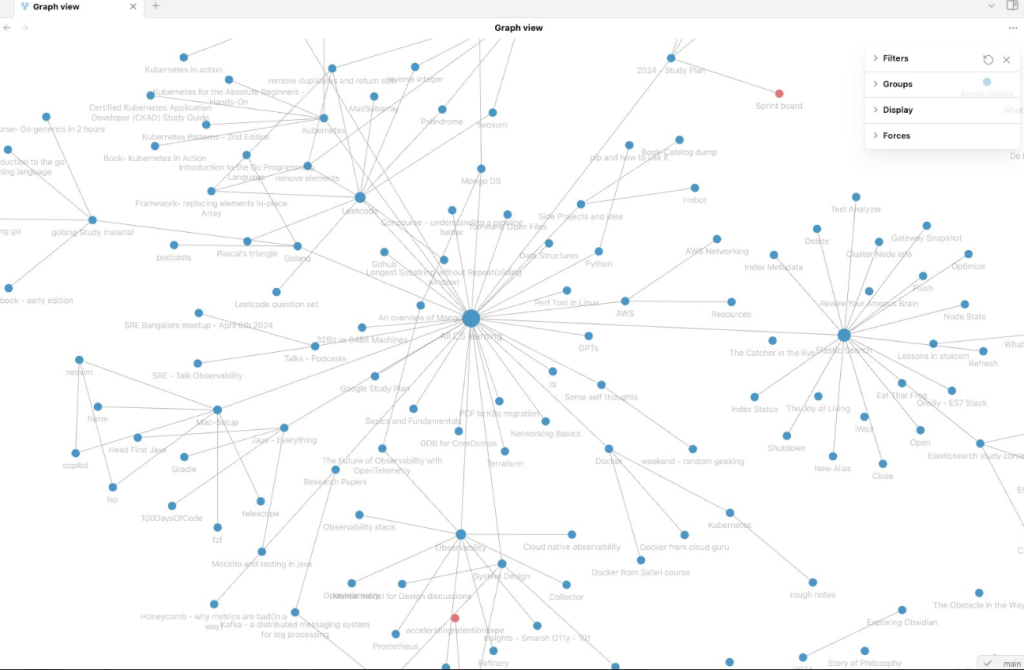
While I do have a case for why obsidian is better than other tools – it is true that it has a larger initial learning curve. I have tried them all. Evernote, OneNote, Notion. They all have their right place and I love notion in particular. But as the number of notes grow in particular, that is when Obsidian shines. It connects them all and shows the interlinking between them. I had like 1200+ notes when I migrated from Notion into Obsidian, and below is how my notes graph looks like.

A zoomed in section of it:

But again, why Obsidian ?

  • Markdown and simple notes first approach: Obsidian shines at doing one thing and that one thing well – taking notes. It doesn’t focus on Databases and fancy visuals.
  • Connecting the dots: As you collect and write more of your notes, Obsidian ties it all together. You might have written a self-note about ElasticSearch and completely forgotten about it. But Obsidian shows it in your knowledge graph with all potential matches. Tags, auto-linking, Graph view – all work like a charm.
  • Git backup: I was a Notion user before I moved to Obsidian. I used to be paranoid if Notion blocks my account for whatever reason. I had to take a weekly backup – just in case. With Obsidian there are more than ways of backup. I use github. More on Obsidian plugins here.
  • Ease with terminal: Since Obsidian deals with markdown files(.md), you don’t have to leave the terminal, if you are a terminal person. Nvim has loads of plugins which will make you fall in love with Obsidian, like – telescope , vim-markdown , treesitter etc.
  • Community driven: r/ObsidianMd subreddit has some of the kindest folks. They always help and there are new plugins available almost every week for any fancy stuff.
  • Sync between devices: While other tools like Notion, OneNote shine at this(out of the box) – for obsidian I use gitbackup for sync. For my phone I use Syncthing, a filesync setup for low latency syncing of all my notes. It works like a charm.
  • Full ownership of your data: One of my favorite features of Obsidian is its use of plain text files by default, which offers several advantages: notes can be accessed offline, edited with any text editor, viewed with various readers, easily synced through services like iCloud, Dropbox, or git, and remain yours forever. Obsidian’s CEO, Steph Ango, elaborated on this philosophy in a blog post here.

Use-case where Obsidian helped:

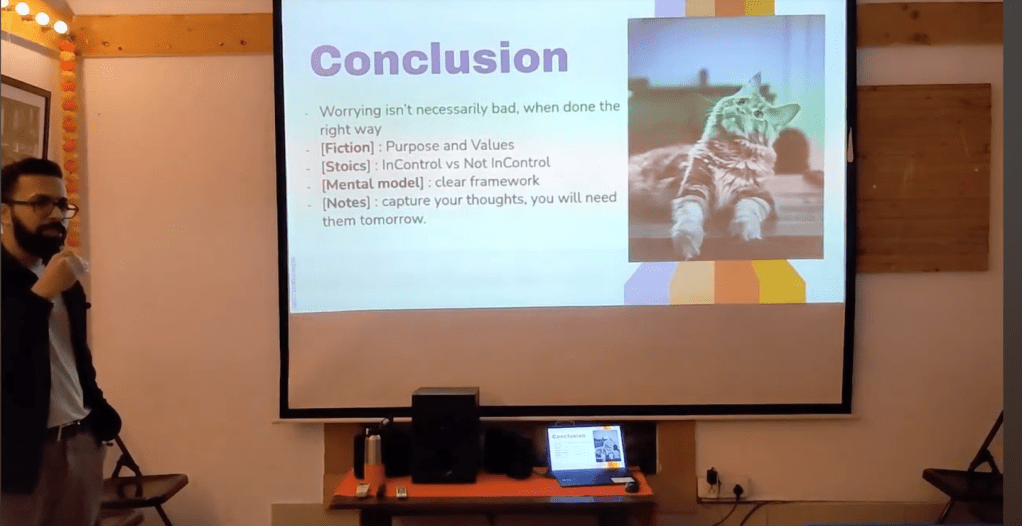
  • I was recently invited to a weekend geekout session. Only criteria was to speak about a “not-so-technical” topic.
  • I picked the topic of “Thinking well” and dived into my Obsidian vault. – YouTube link – 20mins.
  • As I geeked out, to my surprise, 3 non-related books connected with each other for Thinking.
  • A fiction, A philosophical, A non-fiction. Thanks to my obsessive amount of notes, I was able to link them all and tie them up – out of the box on Obsidian. More importantly, I could see the parallels between the books myself without intentionally thinking about them.
Obsidian notes helping link Three differently streamed books.

Some resources on Obsidian that I have found useful:

While this writeup just a brain dump, I don’t intend to say Obsidian is the only way. There are better ways – just that obsidian is working well for me right now.

Below are some resources to dive deep into obsidian:

Let me know what you folks use for notes! Cheers.

Bloom Filter and Search Optimisation

This writeup is an outcome of a side quest while geeking out on System Design.
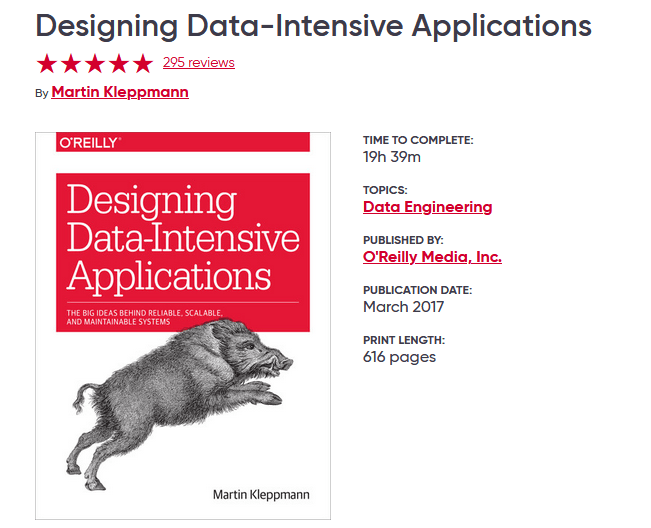
In the book “Designing Data-Intensive Applications,” Bloom Filters are briefly mentioned in the context of datastores, highlighting their significance in preventing database slowness caused by lookup for nonexistent items.

Below are a curious set of questions on the topic on Bloom Filters and how it works.

What is the use case for a Bloom filter?

Imagine you are maintaining a Datastore which has millions of records. You want to search for an item form the Datastore, while you are not sure that the item exists in the first place.

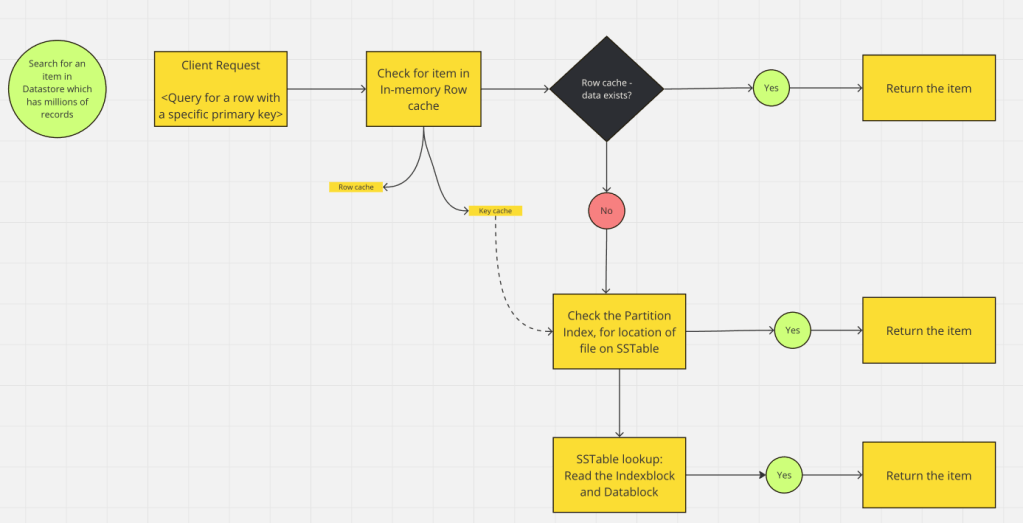
Below is the path for data retrieval, at a very high level (without a bloom filter) on a datastore:

A few points to note here:

  • The items is first looked up for in the cache. If the row cache contains it from recent access, it is returned.
  • If row cache doesn’t have the item, key cache is checked. It contains positions of row keys within SSTables, for recently accessed item. If item key found, can be directly retrieved. Cassandra uses this. Reference link
  • If above cache layer don’t have item, it is looked up in the index for the datastore table.
    • while indexes are meant to be fast, the “primary key” we are searching with, should have a index in the first place.
    • even if the index is present, it can have million of entries. I have seen indexes which are 100+ GBs in size.
  • If the item local from index is found, do an SSTable lookup to retrieve the item with disk seek.(if SSTable is not in memory)

All the above points are for the path flow where the item exists in the Datastore. The worst case is, all the above paths are traversed and to eventually find that item doesn’t exist.
Is there a way to NOT do O(n) on the items stored, to know for sure if the item doesn’t exist in the datastore ?

That is where Bloom Filter comes in handy.
The primary case for Bloom filter is to make sure that most lookups for non-existent rows or columns do not need to touch disk.

How does a Bloom Filter work?

A Bloom Filter is a data-structure that helps answer whether an element is a member of a set. Meaning, if you want to know if an item exists in a datastore, Bloom Filter should help answer it – without scanning the whole datastore.

Bloom filter does allow for false positives. However, it never produces false negatives. So it may tell you have an item in store which doesn’t exist, but if it says an item is definitely not in the set, you can trust it.

At the core of a Bloom filter implementation:

  • It contains a Long Bit Array of bits (0s and 1s), initialised to 0. This array is our Bloom Filter.
  • A bloom filter makes use of multiple hash functions(k). These hash functions will take an input item and map it to a position on the the bit array.
  • When we want to add an element to Bloom filter
    • pass the element through k hashfunctions (k=3 in below case)
    • each hash function maps the element to a position on the bit array
    • set the bit for the positions mapped to 1.
  • To check if an element is present in bloom filter
    • pass the element to k hashfunction
    • each hashfunction maps the element to a position on the bit array
    • if all the bits are 1, the element is probably in the datastore (there might be false positives)
    • if any bit is 0, the element is definitely not in the datastore.

With Bloom filter being added, if we had to recreate the data retrieval path for element in datastore, it would look like below:

A few other notes:

  • Not all databases/datastores have Bloom Filter built-in. Traditional Relational databases don’t have it built-in. However, it can be implemented at the application layer.
  • NoSQL databases like Cassandra, HBase have Bloom filter built in.
  • Some datastores like Dynamodb use other technique like Secondary indexes and partitioning to solve the same usecase.

Resource Usages due to Bloom Filter:

  • Bloom filters are in memory to meet the fast response to check if an item NOT present.
  • The size and memory usage of Bloom Filter is dependent on factors like:
    • Number of Items (n): The number of elements you expect to store.
    • False Positive Rate (p): The acceptable probability of false positives.
    • Number of Hash Functions (k): Typically derived from the desired false positive rate and the size of the bit array.
    • Size of the Bit Array (m): The total number of bits in the Bloom filter.
  • Mathematically finding the size of bloom filter is beyond the scope here, but lets say if we want to store 1 million ID with a false positive rate of 1% – it would take less than 2MB of memory for bloom filter.


In summary, Bloom filters prevent unnecessary item lookups and disk seeks for elements that do not exist in datastores. Without the use of Bloom filters (or similar implementations), it is easy for performance to degrade in any datastore due to frequent searches for nonexistent items.


References:

The above explanation is only at the conceptual level. Deep dive on the math being prediction and implementation on different databases are available in references below:

  • Paper: Bloom Filter Original Paper – “Space/Time Trade-offs in Hash Coding with Allowable Errors” – link
  • Paper: “Scalable Bloom filters” paper – link
  • Paper: “Bigtable: A Distributed Storage System for Structured Data” – link
    • Side Track(non-technical) : You will definitely enjoy the story on how Sanjay and Jeff solved early day issues at Google – “The Friendship That Made Google Huge” – link
  • Casandra documentation on Bloom Filter usage – link
  • HBase documentation on Bloom Filter usage – link

Kafka – an efficient transient messaging system

Over the past few years, I have worked on different multi-cluster distributed datastores and messaging systems like – ElasticSearch, MongoDB, Kafka etc.

From the Platform Engineering/SRE perspective, I have seen multiple incidents with different distributed datastores/messaging systems. Typical ones being :

  • uneven node densities (ElasticSearch – how are you creating shards?)
  • client node issues (client/router saturation is a real thing. And they need to be HA)
  • replicas falling being masters, (Mongo – I see you)
  • scaling patterns with cost in mind (higher per node density without affecting SLOs)
  • Consistency vs Availability – CAP (for delete decisions in application- you better rely on consistency)
  • Network saturation – (they happen)
    and more

But Kafka, in my experience, has stood the test of time. It has troubled me the least. And mind you, we didn’t treat it with any kindness.

This lead me to trying to understand Kafka a little better a few years ago. This write up is just a dump of all the information I have collected.


  • The white paper – Kafka: a Distributed Messaging System for Log Processing. – link
    • This is one of the initial papers on Kafka from 2011.
    • Kafka has changed/expanded quite a bit since, but this gives a good ground on design philosophy of Kafka
  • What does kafka solve? Design philosophy.
    • along with being a distributed messaging queue – the design philosophy is around being fast (achieving high throughput) and efficient
    • Pull based model for message consumption. The applications can read and consume at the rate they can sustain. Built in rate-limiting for the application without a gateway.
    • No explicit caching – rather rely on system page cache. I seen a node with a 4TB data work just fine with 8GB memory needs.
    • Publisher/Consumer model for topics. The smallest unit of scale for consumer is Partitions on the topics.
    • Stateless broker : unlike other messaging services, the information about how much each consumer has consumed is not maintained by broker – but by consumer itself.
    • A consumer can rewind back to old offset and re-consume data
    • The above mentioned white paper has great insights on design philosophy.
  • Kafka doesn’t have client/router nodes. How does it load balance?
    • Kakfa doesn’t need a load balancer. A cluster of kafka just has the broker nodes.
    • A stream of messages of particular type are configured to go to a topic in kafka.
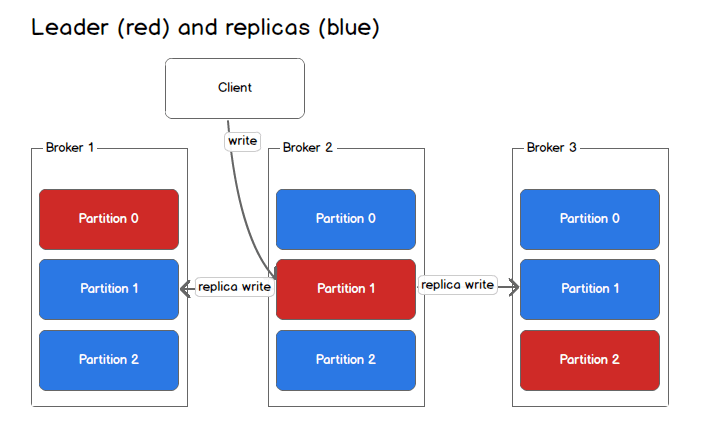
    • A topic can have multiple partitions and each partition has a leader and followers. (number of followers is based on replication set – for HA)
    • Leaders of a partition(for a topic) will be evenly distributed across brokers. And writes to a topic from Producer – always go to the leader partitions.
    • so, the load will be evenly distributed across kafka brokers – as long as – when new message that are written to a topic – are spread evenly across the partitions of a topic.
    • That spreading of messages evenly between partitions is a function of shardkey configured – like any other distributed system. If sharding is not done – round robin is used.
    • Below is the visualization of 1 topic – with 3 partitions and replica set to 3. Also has 3 brokers in the kafka node.
source – https://sookocheff.com/post/kafka/kafka-in-a-nutshell/
  • What makes Kafka efficient?
    • Consumption of messages(events) from kafka partitions is sequentially. Meaning, a consumer always consumes messages in the same order it was written to the partition. There are no random-seeks for data, like you might see in a database/other datastores.
    • This data access pattern of going sequentially rather than random – make it fast by several order of magnitude.
    • The idea of using the system page cache – rather than building its own cache. This avoid double buffering. Additionally, warm cache is retained even when the broker restarts. Since the data is always read sequentially, the need of an active process cache is limited.
    • Very little overhead on garbage collection – since kafka doesn’t cache message in process.
    • Optimized network access for consumers.
      • A typical approach to send any file from local to remote socket involves 4 steps:
        (1) read data from storage in to OS page cache
        (2) copy data from page cache into application buffer
        (3) make another copy to kernel buffer
        (4) send kernel buffer via socket
      • Kafka uses the Unix SendFile api – and sends the stored data directly from OS page cache to the socket. That is avoiding 2 copies of data and one system call. (2) and (3) avoided.
      • Since kafka doesn’t maintain any cache/index on its own(as discussed above), it skips two of those copies.
  • Replication and Leader/Follower in Kafka:
    • replication is configured at the topic level and the unit of replication is partition (as seen in image attached above)
    • Replication Factor 1 in kafka means – there is no replication set, but just the source copy. Replication Factor 2 mean, there is one source and one replica.
    • read/write all go to leader – in latest version you can set the read to go to secondary. But since the replication is at partition level – all reads from a consumer to a topic are already spread to more than one node
    • also note that partition count can be more than number of brokers. A topic can have 16 (or more – I have seen till 256) partitions and can still have 3 brokers
    • The Kafka brokers which have the replicas for a partition of a topic and are insync with the leader are called – In sync replicas
    • A broker can be thrown out of the cluster based on two condition
      • if the leader doesn’t receive the heartbeat
      • if the follower falls too behind the master – The replica.lag.time.max.ms configuration specifies what replicas are considered stuck or lagging.
  • How is Fault tolerance handled in Kafka ?
    • Fault tolerance is directly dependent on how we maintain and handle the Leader/Replicas. Two ways of doing this in data store:
      • Primary Backup Replication – {Kafka uses this}
        • Just the plain secondary insync with primary based on data.
        • so for a cluster to be up – If we have F replicas, F-1 can fail
        • if ack=all is set, it will still pass with F-1 when producer makes a write – because the leader will remove the unhealthy replicas. Even if 1 is present – producer moves ahead. — more here
      • Quorum based replication
        • this is based on Majority wait algorithm.
        • for F number of nodes to fail, we need to have 2F+1 broker in the cluster.
        • A majority vote quorum is required when selecting a new leader when the cluster goes through rebalancing and partitioning.
        • For a cluster to pick a new leader under quorum based setting – for if 2 nodes to down in a cluster – the cluster should have atleast 5nodes. (2F+1)
        • More on this – here
    • For the over all cluster state and for a message is considered as acknowledged by the Kafka, the ack settings for the Producer are important. Details on that here
  • CAP theorem on Kafka – what to do when replicas go down?
    • Partitions are bound to fail. So it is just a question of Consistency vs Availability
    • Consistency : if we want highly consistent data, the cluster can wait on reads/writes until all ISR come back in sync. This adversly affects availability
    • Availability : if we allow a replica which is not currently in sync with latest when a leader went down, the transaction will still proceed.
    • By default kafka from v0.11 favours Consistency – but this can be overridden with unclean.leader.election.enable flag.

Some link and references:

  • The white paper – Kafka: a Distributed Messaging System for Log Processing. – link
  • Kafka basic concepts – link
  • Consumer group and why is it required in kafka – link
  • How does kafka store data in memory link
  • Different message delivery guarantees and semantics – link
  • Kafka ADR – Insync replicas – link

Weekly Bullet #39 – Summary for the week

Here are a bunch of Technical / Non-Technical topics that I came across recently and found them very resourceful.

Technical :

  • AI-Powered Search and Chat for AWS Docs. The best way of consuming AWS docs. — link here
  • A Framework for Thinking About Systems Change – link here
  • BookWyrm – Yet another attempt on building a social media based on book. link here
  • Applying new hardware advancements and benchmarking variants of old databases — link here
    • Cost per Gigabyte on RAM is much lower now than it used to be decade ago.
    • Alternative approaches considered:log-less databases, single-threaded databases, and transaction-less databases, for certain use cases.
  • I have been re-reading the very famous book “Designing Data-Intensive Applications” by Martin Kleppmann. I am publishing my notes and extracts from the book — link here

Non-Technical :

  • Speed matters: Why working quickly is more important than it seems — link here
  • With “Openhimer” being released past week, did you notice a common theme across Nolan’s movies? — Tweet here
  • How to Do Great Work? – Paul Graham – link here
    • This is “The Best” longform article that I have read in years. Below are a few extracts from the same:
    • “The way to figure out what to work on is by working. If you’re not sure what to work on, guess. But pick something and get going.
      “Develop a habit of working on your own projects. Don’t let “work” mean something other people tell you to do.”
      “When in doubt, optimize for interestingness. But a field should become increasingly interesting as you learn more about it.”
      People who do great work are not necessarily happier than everyone else, but they’re happier than they’d be if they didn’t.”

Cheers until next time !

Weekly Bullet #36 – Summary for the week

Here are a bunch of Technical / Non-Technical topics that I came across recently and found them very resourceful.

Technical :

  • [Video-57mins] : What is Continuous Profiling in Performance monitoring and What is Pyroscope – with Ryan Perry – link
  • Go 1.20 is here(link). A thread on all the changes – here
  • “What’s the best lecture series you’ve seen?” – Thread link
  • Some great side project idea on the thread – here. My fav is PlainTextSports
  • EC2 and cost parameters on AWS – More such single slide explaination here

Non-Technical :

  • [Video-6mins]: How to double your Brain Power – Tiago Forte, the author of the book – Building a Second Brain – Youtube link
  • “I want to lose every debate” – The mindset to learn here is gold. – Link
  • Wonders of street view – Randomly visit any place from your browser – Link
  • [Podcast]:  Carolyn Coughlin – Becoming a good listener – link
  • How to get new ideas – by Paul Graham – link
  • An extract from a book :

When setting expectations, no matter what has been said or written, if substandard performance is accepted and no one is held accountable—if there are no consequences—that poor performance becomes the new standard. Therefore, leaders must enforce standards.

Extreme Ownership, by Jocko Willink;Leif Babin

Cheers, until next time!

[Tiny tool]: Book Extract Reminders

There is no better pleasure than the Joy of solving your own problems.

This write up is not to show off coding skill(there is hardly any code in this tool), but to show the ease with which anyone can build tools to solve problems these days.

Problem statement:

How to retain the most out of the books we read? Maybe receiving daily reminders with extracts from the books?

I consume books mainly in the digital format(via kindle/calibre). I have a lot of highlights in these books which I want to be periodically reminded about. I felt, if I take out 6hours in reading a book, and completely forget all learnings in next 6months, then that’s not efficient.

Solution:

So the idea was, build something that:

  • takes all my highlights from the kindle/calibre (currently manual – to be automated)
  • pull these highlights in to git
  • python tool, that randomly pick 10(configurable) highlights
  • mails them to gmail using smtplib.
  • automate the workflow via github action to run daily at a specified time.

The code is available for anyone to take a look at here on git. Kindly go through README file for more details.

Below is the mail format that is sent daily(7am) with the extracts from the books that I have read and highlighted.


A few things:

  • If you wish to receive these mails as well, cut the PR here, with your mail id. If you are not comfortable sharing mail-id on git, mail me(akshaydeshpande1@acm.org), I will add you in to a gitingnore file.
  • Feel free to fork the repo and run it with your quotes/highlights from your books [MIT licensed].
  • If you mainly consume books as hard copies, then you can use Google Lens to get the text out of your books and add it to git.

Open for any ideas / suggestions.

Weekly Bullet #28 – Summary for the week

Here are a bunch of Technical / Non-Technical topics that I came across recently and found them very resourceful.

Technical :

  • All recording from PyCon US 2021 are up on Youtube here. My fav is Keynote by Robert Erdmann about rebuilding 5 µm resolution picture of Rembrandt’s painting “The Night Watch” from 18th century with Python.
Rembrandt’s painting “The Night Watch” from 18th century
  • “Docker For The Absolute Beginner” course. This is offered free on kodekloud.com . The same course was taken by over 97,000 students on Udemy.
  • datefinder is an amazing python module for location date out of different date formats in a string. Here is a short video about the same.
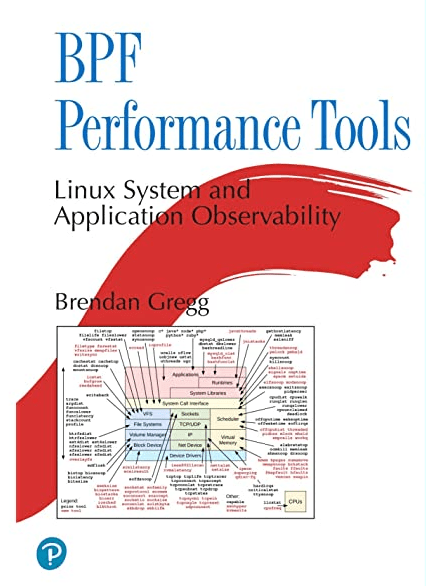
  • Book recommendation – “BPF Performance Tools” – By Brendan Gregg.
    BPF-based performance tools give you unprecedented visibility into systems and applications, so you can optimize performance, troubleshoot code, strengthen security, and reduce costs.

Non-Technical :

  • “How to work Hard” – link here
  • Ironic to the above article — “Always be quitting” – ideas here
  • Language learning with Netflix – chrome extension here
  • Extract from a book :

You never want a serious crisis to go to waste. Things that we had postponed for too long, that were long-term, are now immediate and must be dealt with. [A] crisis provides the opportunity for us to do things that you could not do before.

The Obstacle in the way – Ryan Holiday

Weekly Bullet #16 – Summary for the week

Hi All !

Here is the weekly summary of Technical / Non-Technical topics that I found very resourceful.

Technical:

  • A large number of people involved in Tech industry do not know Coding. A great small post on advice to the same group – “The Surprising Number Of Programmers Who Can’t Program
  • Another Git repo for a wide set of Computer Science Resources – “ComputerScienceResources.”
  • Book recommendation : “Web Performance basics”. It talks about the basic of Web waterfall charts, Profiling charts, CPU & Memory profiling for web etc.

Non-Technical:

“Don’t let your attention slide. Einstein didn’t invent the theory of relativity while he was multitasking at the Swiss patent office. It came after, when he really had time to focus and study. You’ll never complete all your tasks if you allow yourself to be distracted with every tiny interruptions.”

The Daily Stoic

Have a great week ahead !