Weekly Bullet #17 – Summary for the week

Hi All!

To make these posts more Quality oriented, I am trying to reduce the frequency of posts from weekly to fortnightly (based on content). Simply put – I will not write if I don’t have anything that will add value to you.

Here is the weekly summary of Technical / Non-Technical topics that I found very resourceful.

Technical:

Non-Technical:

  • What is “Pluralistic ignorance” ? – Don’t fall for it. [Watch the full video at the end]
  • The Buffett Formula“: How To Get Smarter — The simple (but not easy) way to acquire wisdom.
  • Documentary recommendation : “The Internet’s Own Boy: The Story of Aaron Swartz” [IMDB : 8.1/10]
  • If you ever forget your WiFi password or you want to get your school WiFi password etc. Just type this command into the command line of a computer already connected to that WiFi.
netsh wlan show profile <WiFi-name> key=clear
  • Quote from the book Daily Stoic :

” One of the most powerful things you can do as a human being in your hyperconnected, 24/7 media world is say: “I don’t know.” Or, more provocatively: “I don’t care.” “

Ryan Holiday

Happy week ahead!

Weekly Bullet #16 – Summary for the week

Hi All !

Here is the weekly summary of Technical / Non-Technical topics that I found very resourceful.

Technical:

  • A large number of people involved in Tech industry do not know Coding. A great small post on advice to the same group – “The Surprising Number Of Programmers Who Can’t Program
  • Another Git repo for a wide set of Computer Science Resources – “ComputerScienceResources.”
  • Book recommendation : “Web Performance basics”. It talks about the basic of Web waterfall charts, Profiling charts, CPU & Memory profiling for web etc.

Non-Technical:

“Don’t let your attention slide. Einstein didn’t invent the theory of relativity while he was multitasking at the Swiss patent office. It came after, when he really had time to focus and study. You’ll never complete all your tasks if you allow yourself to be distracted with every tiny interruptions.”

The Daily Stoic

Have a great week ahead !

Weekly Bullet #15 – Summary for the week

Hi All!

Here is the weekly summary of Technical / Non-Technical topics that I found very resourceful.

Technical:

  • What if I told you that CPU % that you always monitor is Wrong! Did you know that requests stalled (waiting) due to memory I/O are counted in CPU utilization ? Here is more on – CPU Utilization is wrong.
  • I am a Mechanical Engineer by degree and Computer Engineer by profession. Here are the stories of self taught CS Engineers.No CS Degree
  • The online library that collects education CS material from Stanford courses and distributes them for free. I particularly liked the Unix section. – Stanford CS Education library.
  • Book recommendation (courtesy: Alok). “High Performance Web Sites” – This book lists 14 specific rules to improve you client side performance.

Non-Technical:

  • What differentiates Professionals from Amateurs. – link
  • I love Emails. Unlike “instant” messages, they don’t pressure you to respond quickly without thinking much. Here is a great write-up on – Composing better mails.
  • A cool way of exploring realistic virtual Universe, travel from star to star, from galaxy to galaxy, landing on any planet, moon, or asteroid with the ability to explore its alien landscape. All on you computer. Check — Space Engine
  • A quote from a book – Mindwise

“More time together did not make the couples any more accurate; it just gave them the illusion that they were more accurate.”

Nicholas Epley

Weekly Bullet #14 – Summary for the week

Hi All !

Here is the weekly summary of Technical / Non-Technical topics that I found very resourceful.

Technical:

Julia Evans

Non-Technical:

  • [Highly recommended] An interactive Periodic table. Play around with temperature scale. – link
  • What is the best way of learning something new ? Here is what Richard Feynman says. – “Technique for learning something new.
  • Here is an extract from the book that I am reading :

“People are unhappy when they detect an unfulfilled desire within them. They work hard to fulfill this desire, in the belief that on fulfilling it, they can gain satisfaction. The problem, though, is that once they fulfill a desire for something, they adapt to its presence in life and as a result stop desiring it – or at any rate, don’t find it as desirable as they once did. They end up as dissatisfied as they were before fulfilling the desire. Never take the things that you have for granted.”

Greg McKeown

Have a great week.

Weekly Bullet #13 – Summary for the week

Hi All !

Here is the weekly summary of Technical / Non-Technical topics that I found very resourceful.

Technical:

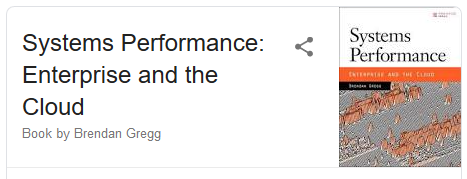
  • Talk by Brendan Gregg – Cloud Performance Root Cause Analysis at Netflix. YOW conference. – YouTube-Link. Length: 1hour
  • University of Helsinki are offering free course in AI. After finishing you’ll receive certificate you can add to your any profile. – link
  • Raspberry Pi 4 is available now! Also, here are the cool projects that can be built using Raspberry Pi.link.
  • A list of pioneers in computer scienceWikipedia-Page

Non-Technical:

  • How to Be Great? Just Be Good, Repeatably Article-Link
  • Documentary : Richard Feynman, more than a well known physicist, he is an amazing personality. This guy has had a great impact on my life. Here is a documentary on this amazing persons life – YouTube-link. – Length: 1hour.
  • Johy Ive, the Chief Design Officer of Apple is leaving Apple to form independent design company with Apple as client. – Link
  • A site that lists the “Top Sites” globally and country wise. I found Computer and Business category sites interesting. – TopSites.
  • An extract from the book that I am reading :

“Life (and our job) is difficult enough. Let’s not make it harder by getting emotional about insignificant matters”

The Stoic

[Performance Debugging] : Root causing “Too many open files” issue

Operating system : Linux

This is a very straight forward write-up on how to root cause “Too many open files” error seen during high load Performance Testing.

This article talks about:

  • The ulimit parameter “open files”,
  • Soft and Hard ulimits
  • What happens when the process overflows the upper limit
  • How to root cause the source of file reference leak.

Scenario :

During a load test, as the load increased, I was seeing failures in transaction with error “Too many open files”.


Thought Process / background:

As most of us already know, we see “Too many open files” error when the total number of open file descriptors crosses the max value set.

There are couple of important things to note here :

  • Ulimit means – User limit for the use of system wide resources. Ulimit provided control over the resources available to the shell and the process started by it.
    • Check the user limit values using the command – ulimit -a
  • These limits can be set to different values to different users. This is to let larger set of system resources to be allocated to a user who owns most of the process.
    • Command to check ulimit values for different user —  sudo – <username> -c “ulimit -a”
  • Ulimit in itself is of two kinds. Soft limit and Hard limit.
    • A hard limit is the maximum allowed values to a user, set by the superuser/root. This value is set in the file /etc/security/limits.conf. Think of it as an upper bound or ceiling or roof.
      • To check hard limits – ulimit -H -a
  • A soft limit is the effective value right now for that user. The user can increase the soft limit on their own in times of needing more resources, but cannot set the soft limit higher than the hard limit.
    • To check soft limits – ulimit -S -a

Now that we know to a fair extent about ulimit, let’s see how we can root cause the reason for “Too many open files” error and not just increase the max limits for the parameter.


Debugging:

  • I was running a load test(that deals with a lot of files) and after a certain load limit, the test started to fail.
  • Logs showed exceptions with stacks leading to “Too many open files” error.
  • First instinct – Check the values set for open file descriptor.
    • Command –  ulimit -a
    • Note: it is important to check the limits for the same user who owns the process.
  • The value was set to a very low limit of 1024. I increased it to a larger value of 50,000, and quickly reran the test. (link on how to make the change mentioned in above section)
  • Test started failing even after increasing the open file descriptor values.
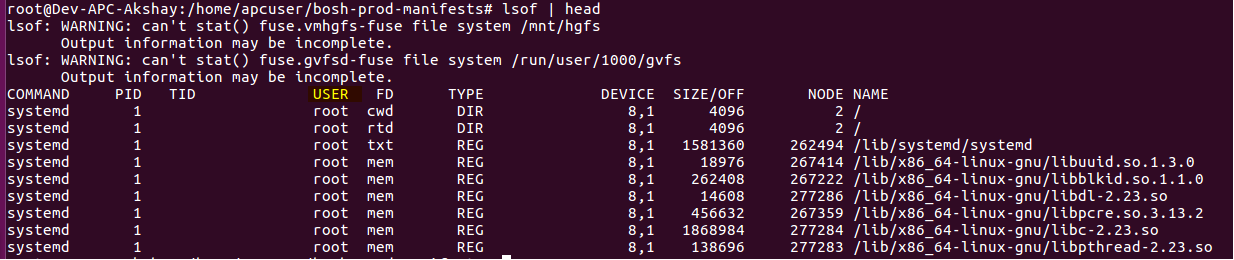
  • I wanted to see what where these file references which were being held on to. So I took a dump of open file references, and wrote to a file.
    •  lsof > /tmp/openfileReferences.txt

  • Above commands dumps the files referenced all the users. Grep out the output only for the user that you are interested in .
    •  lsof | grep -i “apcuser” > /tmp/openfileReferences.txt
  • Now if you look in to the lsof dump, you will see the second column being the ProcessID which is holding on to the file references.
  • You can run the below awk command which sums up the list of open files per process, sorts it based on the process holding max number of files and lists the top 20.
    • cat openfile.txt | awk ‘{print $2 ” ” $1; }’ | sort -rn | uniq -c | sort -rn | head -20
  • That’s it ! Now open the dump files and look at the files held in reference (last column from lsof dump.). It will give the file which is held in reference.
  • In my case, it was a huge list of temp files which were created during the process, but the stream was not closed, leading to file reference leaks.

Happy tuning!


Weekly Bullet #12 – Summary for the week

Hi All !

Here is the weekly summary of Technical / Non-Technical topics that I found very resourceful.

Technical:

  • Three scientists published a paper proving that Mercury, not Venus, is the closest planet to Earth using Python. Checkout the amazing visualizations built using Python for the same. Article – link . Video – link.
  • What happens behind the scenes when you do a search in Google. – “How web works.
  • Here are a bunch of great qualities that every senior-engineer (pre-manager / manager), ideally should poses. Check out — ” What are the signs that you have a great manager?
  • One of my mentors always says this – “You are paid for your thinking and problem solving abilities”. Here is a great compilation of websites which will help you hone these skills. — “A list of all problem solving websites.

Non-Technical:

  • Here is another great Reading list. Note: Books are mainly Non-fictional / Programming related. — “Popular reading lists.
  • This year marks the 50th anniversary of first ever Moon landing. Here is a super-cool website to relive Apollo 11 mission! — “Apollo 11 in Real Time“. Click on Join-in Progress button.
  • Wikipedia compilation of common misconceptions across Art & Culture, History and Science. Fun read. – “List of common misconceptions
  • An extract from the book that I am reading :

“A person’s success in life can usually be measured by the number of uncomfortable conversations he or she is willing to have.”

Brene Brown

Weekly Bullet #11 – Summary for the week

Hi All !

Here is the weekly summary of Technical / Non-Technical topics that I found very resourceful.

Technical:

  • Java comes with built-in Performance monitoring tools, which you might want to be familiar with – link
  • AWS costs every programmers should know – link . Also related info on all EC2 instances. – link
  • Various JVM options available, along with their descriptions. – “Java hotspot VM options“. There are over 100 options along with descriptions like below.

Non-Technical:

  • Did you know about Zero Rupee Notes in India ? – “Zero Rupee Note
  • Best advise – “Keep a track of your failures.” – full post link
  • An extract from a book I am reading:

“Perhaps the biggest tragedy in our lives is that freedom is possible, yet we can pass our years trapped in the same old patterns.”

Jamie Foxx

Have a great week ahead!

Weekly Bullet #10 – Summary for the week

Hi All !

Here is the weekly summary of Technical / Non-Technical topics that I found very resourceful.

Technical:

Non-Technical:

  • Books recommended by over 100 founders and makers in tech. “Rework” is my all time favorite from the list. – ” Founder Books
  • I have written about Spaced repetition and Anki tool for the same. It does wonders and here is a write up on – “Tips for using Anki and Spaced Repetition in 2019
  • A map of the US where city names are replaced by most Wikipedia’ed resident. Try zooming in and out. – “A People Map of the US
  • An extract from the book that I am reading:

“Khaled Hosseini wrote The Kite Runner in the early mornings before working as a full-time doctor. Paul Levesque (page 128) often works out at midnight. If it’s truly important, schedule it. As Paul might ask you, “Is that a dream or a goal?” If it isn’t on the calendar, it isn’t real.”

Brain Koppelman

Performance Bottleneck : High CPU Utilization vs High CPU Saturation

This article is more about a performance scenario that I found myself in, a few days ago, and my thought process about the same. It is about a situation when a Performance Engineer has to weigh the impact of CPU Saturation and not just CPU Utilization.

Scenario:

I was testing the Horizontal Scaling efficiency of an AWS EC2 instance, and at some points I was seeing low CPU utilization but high CPU Saturation (higher load averages).
Should I be spinning up new AWS instance because the CPU is saturated, although I have low CPU utilization (CPU % usage)?

Thought process:

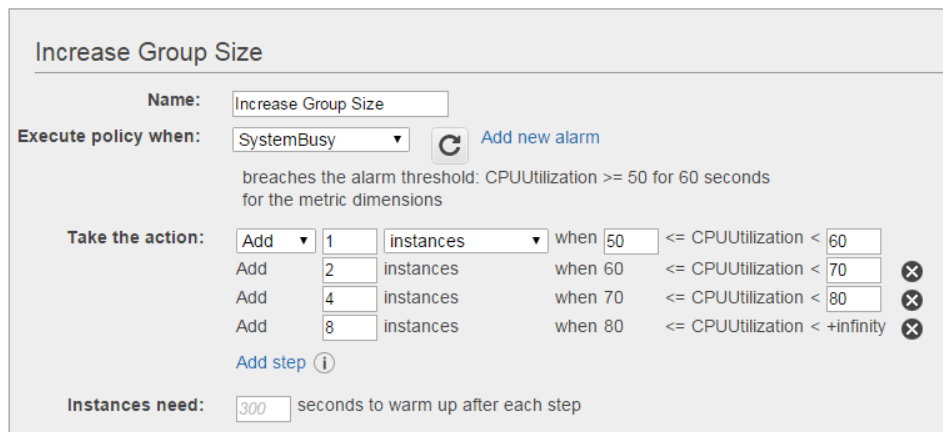
More often than not, we horizontally scale to +1 instance of a server based on CPU % utilization. Say, if the CPU % reached between 50 – 60% , add one more instance.

But what about CPU Saturation? Should we also scale when the CPU is saturated, but the utilization is low (say 40%).
Here it is important to understand the meaning of “CPU Saturation“.

Let’s say that the system under test is a 4 core box. We will say that the system is Saturated if :
– your load average (first line in – top command) will increase to a very large value above 4 (system under test is 4 core box)
– load average remains at a large value for a long duration of time.
– there are large number of requests in queue/blocked for CPU time. (run the command: dstat -p)

Above situation correlates with a supermarket, which has 4 billing counters, but there are 50 customers who want to get billed for their purchase. Since there are only 4 billing counters, 46 of them have to wait! This is Saturation.


And what will happen if the system is saturated?
– The requests will wait longer in the idle state, waiting to run on the CPU.
– The overall response time of the requests will increase. Reference link.
– The corresponding CPU utilization (%) will also increase by a certain value.

What did I do?

  • I checked how long the CPU stayed at the saturated state. “How long did the the queue length was significantly high” to see if this is seriously after the end-user experience. More on this here.
  • It was for about 4 to 7 minutes roughly every-time.
  • I tried to figure out, why the requests are taking longer to run on CPU, resulting in increased queue-length.
  • On further digging in, I found that end point – Mongo/Kafka where my writes were happening, was slowing down with increasing load. And being the actual cause for more time for requests.
  • Important point to note here is — Load average is not as straight as it looks! Load average apparently includes the tasks waiting on IO. More on this here.
  • Tuning was required on writes to end-points.

Learning :

  • Next time when the CPU looks saturated, check the corresponding IO’s on the endpoints.
  • Check if the corresponding Response times are going bad, and not directly increase the horse power on CPU.
  • Also, an occasional high CPU Saturation is just fine!

Happy tuning.