
This post is a geek-out journey this festive season on finding the right tool for my personal finance management.
Where it all started:
Recently, I spoke at the Smarsh Tech Summit on “Cost as an Architectural Pillar,” where I emphasized the importance of considering cost as a first-class citizen in the software development cycle.

However, on a similar note, when I was looking through my personal finances later, I wasn’t very happy when I had to apply the same principle.
I was using one of the apps for finance management, and it was all over the place. Since it is festive time off at work, I started looking around for the best way to fix this and track my personal finance the right way.
When I started looking out for tools – I had a set of criteria:
- Can the tool follow “local first” approach? I don’t want to share all my financial data to a third party tool.
- Can it work well on terminal? (I spend too my time at my laptop – not phone)
- Can I query it via cli and get only what I need?
Ledger cli:
While this lead me to a few options, nothing came close to what ledger-cli can do.
https://ledger-cli.org/doc/ledger3.html
Managing a full fledge ledger book for personal finance looked daunting at the first site, but the CLI compatibilities kept me hooked, and it has been really worth the time and effort.
Note : If you decide to take this route, I would highly recommend reading through Basics of accounting with ledger
https://ledger-cli.org/doc/ledger3.html#Principles-of-Accounting-with-Ledger
Lets start with a few examples first on how I use it:
- Install the ledger cli. For mac from here
- At the end of this post, you will find a example ledger file. Save it as “transaction.ledger” file. It has all dummy values. Lets see a few queries on it first.
- What is actual net-worth right now?
ledger -f transactions.ledger bal assets liabilities

- How do my expenses look like and how to they tally against source accounts?
ledger -f transactions.ledger bal
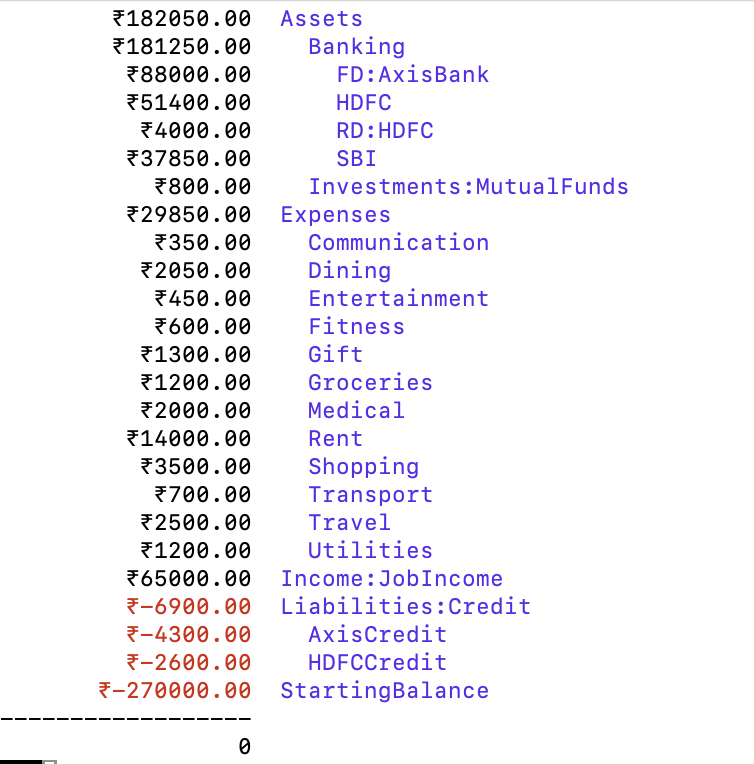
- What are my top expenses, sorted based on amount spent?
leger -f transaction reg Expenses -S amount

- A few other interesting queries :
- How much did I spend and earn this month? – “
ledger bal ^Expenses ^Income --invert“ - How much did I spend over the course of three days? – “
ledger reg -b 01/25 -e 01/27 --subtotal“
- How much did I spend and earn this month? – “
- You can even create a monthly budget and stick within that.
Now that we know what a ledger can do, here are a few features of it:
- Simple but Powerful Double-Entry Accounting: Ledger CLI follows double-entry bookkeeping, which helps track every asset and liability in a systematic way. It’s not just a checkbook register; it’s a full-fledged accounting system that works in plain text. I write down my expenses, income, and transfers, and it keeps everything balanced.
- Assets and Liabilities Management: Managing assets like savings accounts or liabilities like credit cards is straightforward. You simply create accounts and keep track of every inflow and outflow. For me, categorizing my finances into different buckets like “Bank”, “Credit Card”, and “Investments” helps give me a full picture.
- Automation and CLI Integration: One of the best parts of using Ledger CLI is the ease of automation. With simple bash scripts, I’ve automated some repetitive tasks—like importing my bank statements or tallying up expenses at the end of the week. Using cron jobs, I’ve even set up scheduled jobs to summarize my financial status, directly in my terminal, every Sunday.
- Customization with Neovim: Since Ledger CLI is just text, it means I can edit everything directly in Neovim. With some custom syntax highlighting and autocompletion settings, it’s easy to track and categorize transactions quickly. The whole experience is tailored exactly to my taste—simple, keyboard-driven, and powerful.
- Obsidian plugin for Ledger cli: I use obsidian for all my note taking. Having the cli plugin from within obsidian is very convenient if I want to plot expense graphs.
https://github.com/tgrosinger/ledger-obsidian
The fact that I can manage all my finances from the terminal, have only a local/git copy of it, and have native obisidian integrations is working well for ledger cli and me.
And btw, you still have to enter the expense entries on your own. There is a potential for automating it via inputing a statement file, but I am happy maintaining it manually for now.
PS:
Below is how ledger file looks like {all dummy values} – if you want to play around or use for reference template:
- The first part of the file manage Assets, Liabilities, Expense and Income aliases.
Starting Balances: This section records the assets and liabilities on Day0- The third part of the file shows the expense entries. It has two part – form of expense and the account the expense came from.
alias a=Assets
alias b=Assets:Banking
alias br=Assets:Banking:RD
alias bfd=Assets:Banking:FD
alias c=Liabilities:Credit
alias l=Liabilities
alias e=Expenses
alias i=Income

; Lines starting with a semicolon are comments and will not be parsed.

; This is an example of what a transaction looks like.
; Every transaction must balance to 0 if you add up all the lines.
; If the last line is left empty, it will automatically balance the transaction.

; Starting Balances
; Add a line for each bank account or investment account
b:HDFC                 ₹150000.00
b:SBI                  ₹40000.00
bfd:AxisBank           ₹80000.00
a:Investments:MutualFunds ₹30000.00
StartingBalance        ; Leave this line alone

2024-10-01 Gym Membership Payment
  e:Fitness               ₹600.00 ; To this account
  c:HDFCCredit                 ; From this account

2024-10-03 Grocery Shopping at BigBazaar
  e:Groceries            ₹1200.00
  b:SBI

2024-10-04 Netflix Subscription
  e:Entertainment        ₹450.00
  c:AxisCredit

2024-10-06 Restaurant - Dinner with Friends
  e:Dining               ₹1800.00
  b:HDFC

2024-10-08 Salary for October
  i:JobIncome           ₹65000.00
  b:HDFC

2024-10-10 Rent Payment
  e:Rent                 ₹14000.00
  b:HDFC

2024-10-12 Medical Bills
  e:Medical              ₹2000.00
  c:HDFCCredit

2024-10-14 Bike Maintenance
  e:Transport            ₹700.00
  b:SBI

2024-10-15 Investing in Fixed Deposit
  bfd:AxisBank          ₹8000.00
  b:HDFC

2024-10-16 Online Shopping (Amazon)
  e:Shopping             ₹3500.00
  c:AxisCredit

2024-10-18 Electricity Bill Payment
  e:Utilities            ₹1200.00
  b:HDFC

2024-10-20 Travel - Weekend Getaway
  e:Travel               ₹2500.00
  b:HDFC

2024-10-22 Dining - Coffee with Colleagues
  e:Dining               ₹250.00
  b:SBI

2024-10-24 Monthly SIP Investment
  a:Investments:MutualFunds  ₹800.00
  b:HDFC

2024-10-26 Mobile Bill
  e:Communication        ₹350.00
  c:AxisCredit

2024-10-28 Gift for Friend's Birthday
  e:Gift                 ₹1300.00
  b:HDFC

2024-10-30 Savings Transfer to Recurring Deposit
  br:HDFC                ₹4000.00
  b:HDFC
 Engineering Blog