
In this write up, we will try and explore how to make the most out of the resources in K8s cluster for the Pods on them.
Resource Types:
When it comes to resources on Kubernetes cluster, they can be fairly divided in to two categories:
compressible:- If the usage of this resource for an application goes beyond the max, it can be throttled without directly killing the application/process.
- example : cpu – if a container consumes too much of compressible resource, they are throttled
non-compressible:- If the usage of this resource goes beyond max, it cannot be directly throttled. Might lead to killing of process.
- example : memory – if a container consumes too much of non-compressible resource, they are killed.
For each pod on a k8s, there are mainly 4 types of resources which need tuned and management based on the application running:
CPU, Memory, Ephermal-storage, Hugepage-<size>
Each of the above mentioned resource can be managed at Provisioning level and Cap usage level on K8s. That is where requests/limits in K8s come in handy.
Request/Limits:
Requests and Limits are the important part of Resource management for Pods and containers.
Requests: is where you define how much of resource your pod needs, when it is getting scheduled on worker node.Limits: is where you define what is the max value that the resource can stretch to, when consuming the resource on worker node.
Lets consider the deployment yaml file for a application which has request/limit defined on cpu and memory.
It is important to note that when a pod is provisioned on a worker node by kubernetes scheduler, the value mentioned in requests is taken into consideration. The worker node needs to have the amount resource described in requests field for the pod to be scheduled successfully
apiVersion: apps/v1
kind: Deployment
metadata:
  name: my-app
spec:
  template:
    spec:
      containers:
        - name: app1
          resources:
            requests:
              memory: "64Mi"
              cpu: "250m"
            limits:
              memory: "500Mi"
              cpu: "800m"
    metadata:
      annotations:
        link.argocd.argoproj.io/external-link: app.argo.com/main/
At a high level, the concept of requests/limits is similar to soft/hard limits for resource consumption. (more like xms/xmx in Java). These values are generally defined in the deployment file for the pod.
It is an option to either set Request/Limits individually or skip them altogether(based on the kind of resource). If the requests and limits are set incorrectly, this could lead various issues like:
- pod instability
- workers being underused
- incorrect configuration for compressible and non-compressible resources.
- worker nodes being over-committed.
- affecting directly the quality of service for a pod (Burstable, Best-Effort, Guaranted)
Now lets try and fit in different Requests/Limit metrics for CPU and Memory resources for an application deployed on K8s cluster
CPU :
- CPU is a compressible resource – can be throttled.
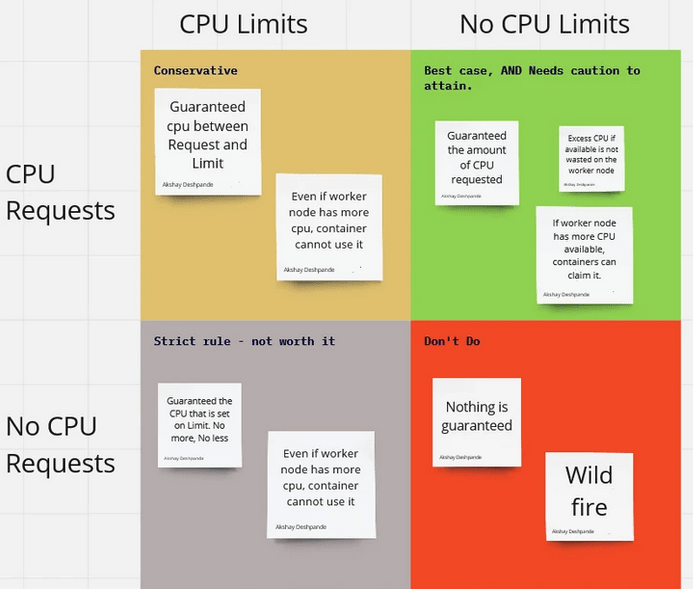
- It is an option to NOT set Limit on CPU. In that case, if there is more CPU available on the worker note, unused, the pods without limits can over-commmit and use the available CPU.
- It is an option to not set Limit for resources which are compressible, because they can be throttled when there is worker needs the memory back.
- If your application needs guaranteed Quality of Service, then set the Request==Limit
- Below is general plot of Request/Limits for CPU
Memory :
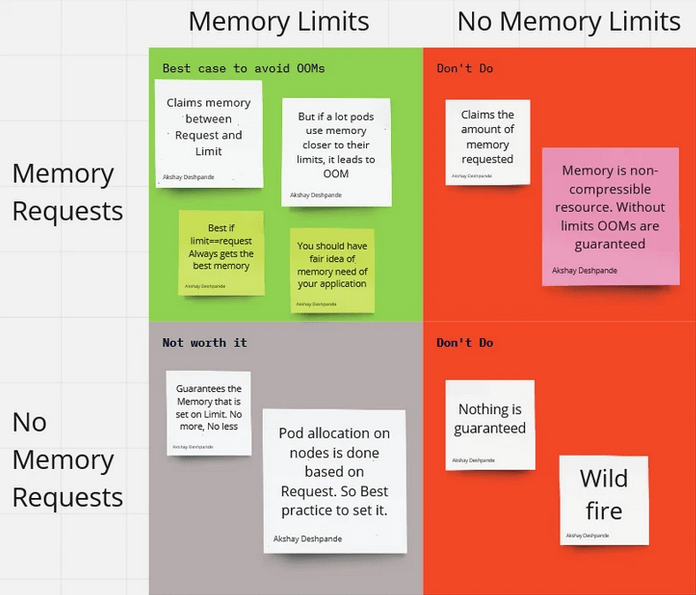
- Memory is a non-compressible resource – cannot be throttled. If a container uses more memory, it will be killed by the kubelet.
- You cannot ignore Limits like in CPU resource because when the memory need of the app increases, it will over-commit and affect the worker node.
- Values for limits and requests based on the application needs and tuned based on production feedback of the container.
- If your application needs guaranteed Quality of Service, then set the Request==Limit
- Below is general plot of Request/Limits for CPU
Resources for further reading:
 Engineering Blog
Nice one! Would love some case studies from any issues you have encountered/resolved.
LikeLiked by 1 person